

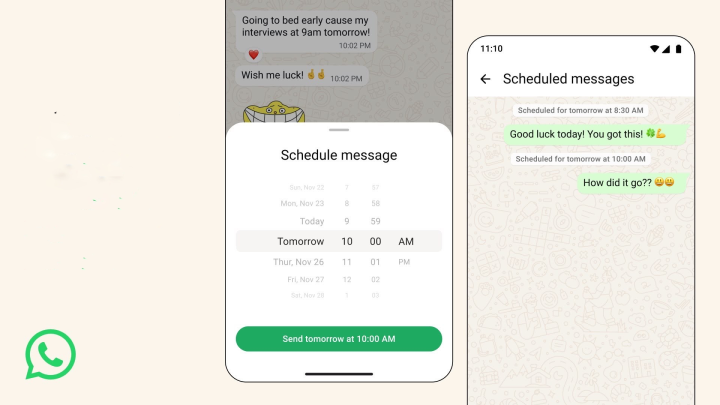
WhatsApp now lets you schedule messages in both individual and group chats, a feature users have requested for a long time. The Meta-owned app began rolling out the capability on Wednesday, November 25, 2026, globally across iOS and Android. Anyone who has wanted to send a message at the right moment without being awake or available to tap send now has a simple way to do it.
The process is straightforward: type your message, then long-press the send button to schedule it. You can choose to send a message anywhere between 10 minutes and 14 days later.
How to Schedule WhatsApp Messages Step by Step
Using the new tool takes only a few moments, and it works the same way in one-on-one conversations and group chats. The steps are consistent across both chat types.
Open the chat where you want to send a message.
Type the text, photo, or video you want to deliver.
Long-press the send button instead of tapping it.
Choose a delivery time, anywhere from 10 minutes up to 14 days ahead.
That is the entire process. There is no separate menu to dig through and no extra setting to enable. The long-press action is the key that unlocks the scheduling option.
Managing and Deleting Scheduled Messages
Once a message is scheduled, users will be able to see all their scheduled messages in one place. From there, they can delete them if needed. This gives senders a chance to review or cancel something before it goes out.
One detail that remains unclear is whether there is a way to edit the schedule of a message after it is set. The announcement did not confirm an editing option, so users may need to delete and recreate a message to change its send time.
Scheduled Messages Send Even When Your Phone Is Off
One of the most notable details about the rollout is that scheduled messages will be sent even if your phone is off or outside network coverage. That means delivery does not depend on your device being online at the moment the message is due. The message is queued and delivered on schedule regardless of the phone’s status.
You can schedule messages containing text, photos, and videos. The ability to include media makes the feature useful for more than quick text reminders. Photos and videos can be lined up for delivery at a specific time, which adds flexibility for personal and professional use.
Who Benefits From Scheduled Messages
The feature has clear everyday uses, and several groups are likely to adopt it quickly.
Personal chats: Wishing someone a happy birthday on time, even if you are busy that day.
Different time zones: Chatting with friends, family, or colleagues who are awake on a different schedule.
Businesses: Scheduling texts and updates to customers without manual sends.
Work coordination: Updating teams at a specific time using scheduled texts.
For people who use the app to coordinate work, scheduled texts can replace the need to remember and send updates manually. Businesses that communicate with customers may also find it easier to plan messages in advance.
Availability Across iOS and Android
The feature is rolling out globally to all users across iOS and Android. Once it becomes available on a device, the long-press scheduling option appears in chats. Because rollouts happen in stages, some users may see the feature before others.
The update applies to both individual and group chats at the same time, so there is no need to wait for a separate group-chat version.
A Familiar Capability Arrives
Message scheduling is a common capability in messaging apps, and its arrival brings WhatsApp in line with what users have come to expect. The global release across iOS and Android means the feature reaches a very large user base at once.
Meta continues to add features that keep the app competitive. Scheduled messages are the latest addition, and for many users it is a practical one that saves time and reduces the risk of forgetting an important message.