

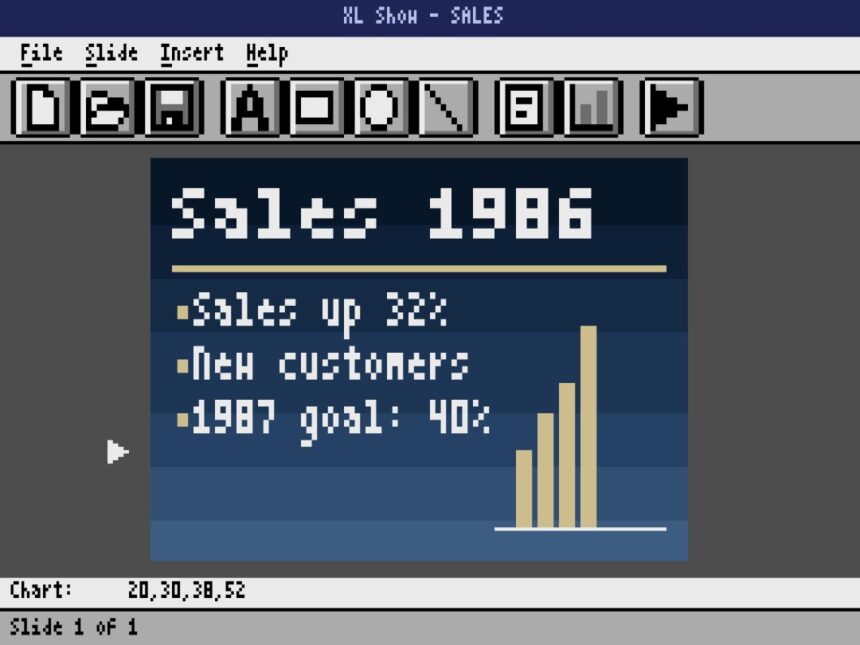
While some collectors fire up old computers to play their favorite retro games, the developers behind XL Office want to turn every one of Atari’s 8-bit XL and XE PCs (with 64 KB of memory) into productivity tools again. The free collection of Atari Office apps includes a word processor, spreadsheet, drawing app, browser, and even a PowerPoint alternative — all designed to work on a PAL or NTSC TV, or an emulator.
That’s right: the same machines many people associate with classic arcade titles can now handle writing, number crunching, drawing, and presentations. For retro computing fans, it’s a surprising and welcome twist on what vintage hardware can still do.
What Makes the Atari Office Apps Collection Stand Out?
Most retro computing projects focus on games, emulation, or hardware restoration. The Atari Office apps collection takes a different path by treating these vintage machines as usable workstations rather than museum pieces.
The suite is called XL Office, and it targets Atari’s 8-bit XL and XE computer line. To run it, a machine needs at least 64 KB of memory — a requirement that covers a wide range of the classic hardware many collectors already own.
What really sets the collection apart is its scope. Instead of a single utility, it bundles several core productivity tools into one free package. Each app is built to work within the tight constraints of 8-bit hardware, which makes the whole project a rare example of modern software development for decades-old systems.
Inside the Atari Office Apps Suite
The XL Office collection covers the tools you’d expect from a modern productivity suite, reimagined for 8-bit hardware. Here’s what’s included:
Word processor — for writing and editing documents
Spreadsheet — for organizing data and working with numbers
Drawing app — for creating graphics
Browser — for accessing content
PowerPoint alternative — for building presentations
Each tool is designed to run on a standard PAL or NTSC TV, so there’s no need for a specialized monitor. That detail matters for collectors, since many Atari 8-bit setups are already connected to a television.
Built for Real Atari Hardware
The developers behind XL Office didn’t cut corners on compatibility. The suite supports both PAL and NTSC display standards, which means it works across regions where Atari’s 8-bit machines were sold.
Memory is the one real constraint. With a 64 KB minimum, the apps are aimed at machines that meet that threshold. Owners of lower-spec systems won’t be able to run the full collection.
An Emulator Option for Everyone Else
Not everyone has a working Atari 8-bit computer on hand. That’s why the Atari Office apps also run on an emulator, letting curious users try the suite without original hardware.
For newcomers to retro computing, emulation is often the easiest entry point. It removes the cost and maintenance headaches of sourcing vintage machines while still delivering the same software experience.
Why the Atari Office Apps Matter for Retro Computing
The retro computing scene has long been dominated by games. Collectors restore hardware, hunt down cartridges, and compare notes on the best ways to play classic titles. Productivity software rarely gets the same attention.
XL Office flips that script. By giving Atari’s 8-bit XL and XE machines a genuine set of office tools, it reframes what these computers are for. The same system used for gaming can now handle writing, number crunching, and presentations.
There’s also a practical angle for hobbyists. Many collectors own Atari hardware but struggle to find reasons to use it beyond occasional gaming sessions. A free productivity suite gives them a new excuse to boot up their machines and put them to work.
How to Get Started With the Atari Office Apps
Running XL Office is straightforward if you already have the right setup. Here’s what you’ll need:
An Atari 8-bit XL or XE computer with at least 64 KB of memory
A PAL or NTSC TV as a display
An emulator, if you don’t have the original hardware
Because the collection is free, there’s no barrier beyond having access to compatible hardware or emulation software. That accessibility is part of what makes the project appealing to both longtime collectors and newcomers.
A Second Life for Vintage Hardware
The story of the Atari Office apps is really a story about reuse. Decades after these computers left store shelves, developers are still finding ways to make them useful.
That’s increasingly rare in the retro world. Most new software for vintage systems leans toward games or technical demos. A full productivity suite is a bigger commitment, and it signals genuine confidence in the platform’s capabilities.
For owners of Atari 8-bit XL and XE machines, the collection offers something tangible: a reason to keep the hardware connected and running. For everyone else, it’s a reminder that old computers can still surprise us.
XL Office proves that decades-old Atari computers still have room for new ideas. With a word processor, spreadsheet, drawing app, browser, and presentation tool in one free package, the Atari Office apps give 8-bit XL and XE owners a real reason to boot up their machines for something other than games.
Whether you run the suite on original hardware or through an emulator, it’s a compelling example of what dedicated developers can build for platforms most people have long since written off.