

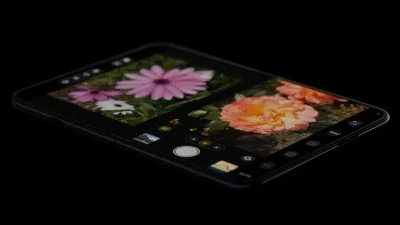
Halide Fill Light is a new capability in Halide 3.4 that uses the iPhone Duo’s outer display to light subjects when the device is unfolded. Rather than depending on the dedicated flash, the feature turns the outer screen into a soft light source, and Halide recommends maximum screen brightness for the strongest output.
The update also adds a camera preview for subjects on the outer display, a larger inner-screen viewfinder, and brings back the shutter timer and color and luminance histograms on other iPhones.
What Is Halide Fill Light?
Halide Fill Light is a lighting tool built around the iPhone Duo’s unique dual-display design. When the device is unfolded, the outer display can face the subject and act as a light panel. This gives photographers an alternative to the dedicated flash, which is often harsher and more direct.
The concept is simple: instead of a small flash firing a quick burst of light, the outer screen stays lit and provides continuous illumination while the shot is composed. That continuous light makes it easier to see how the subject will look before pressing the shutter.
Why Softer Lighting Matters
Hard light from a small flash can create strong shadows and harsh highlights, particularly in portraits and close-up shots. A larger, diffused light source tends to wrap around the subject more gently, producing more even illumination. Because the outer display is significantly larger than a flash, Halide Fill Light offers a softer quality of light that many photographers prefer for people and detailed subjects.
How to Use Halide Fill Light
Using the feature is straightforward, but a few conditions must be met for it to work properly.
Unfold the iPhone Duo so the outer display is available.
Position the device so the outer screen faces your subject.
Set the display to maximum screen brightness for the strongest light output.
Compose your shot using the inner-screen viewfinder.
Take the photo while the outer display continues to illuminate the subject.
Maximum Brightness Recommendation
Halide recommends maximum screen brightness when using Halide Fill Light. The brighter the display, the more light reaches the subject, which matters most in dim environments or when shooting at a distance. Users should keep this in mind when planning low-light shots.
Unfolded Requirement
Halide Fill Light only works when the iPhone Duo is unfolded. This is because the outer display must be exposed and facing the subject to function as a light source. Folded, the device cannot deliver the same effect.
Camera Preview on the Outer Display
Beyond lighting, Halide 3.4 lets users show subjects a camera preview on the outer display. This means the person being photographed can see how they appear in the frame before the shot is taken.
Benefits of a Subject-Facing Preview
A preview on the outer screen helps subjects adjust their pose, expression, and position with confidence. It can reduce the number of retakes and make the process more collaborative, especially when the photographer and subject are not standing side by side.
Larger Inner-Screen Viewfinder
The update also adds a larger inner-screen viewfinder for the iPhone Duo. With more screen space dedicated to the live view, composing shots becomes easier and framing details are simpler to check while the device is unfolded.
Why a Bigger Viewfinder Helps
A larger viewfinder gives photographers a clearer view of the scene, making it easier to judge composition, alignment, and focus. On a device with an expansive inner display, using more of that space for the live preview is a practical improvement for everyday shooting.
Returning Tools on Other iPhones
Halide 3.4 brings back the shutter timer and color and luminance histograms on other iPhone models. These tools return to the app alongside the new iPhone Duo capabilities.
Shutter Timer
The shutter timer lets photographers delay the shot after pressing the button. This is useful for avoiding camera shake, giving subjects time to settle into a pose, or including the photographer in the frame.
Color and Luminance Histograms
Histograms provide a visual readout of exposure and color distribution. The color histogram shows how tones are spread across channels, while the luminance histogram focuses on brightness. Together they help photographers judge whether a shot is properly exposed before and after capture.
Who Is Halide Fill Light For?
Halide Fill Light is aimed at iPhone Duo owners who want more control over lighting without carrying extra equipment. It suits portrait photographers, content creators, and anyone shooting in low light who wants a softer alternative to the flash.
Practical Use Cases
Portraits in dim indoor settings
Close-up product or detail shots
Situations where flash would be too harsh
Collaborative shoots where subjects want to see themselves
Tips for Better Results With Halide Fill Light
Getting the most from Halide Fill Light comes down to a few practical habits.
Always set the display to maximum brightness before shooting.
Keep the outer display clean so light output is not blocked or diffused unevenly.
Position the device so the screen faces the subject directly.
Combine the fill light with a steady hand or support for sharper low-light shots.
Use the subject preview to fine-tune posing before capturing.
Managing Brightness and Battery
Running the display at maximum brightness uses more power. For longer shoots, users should plan for battery drain and consider topping up the device beforehand. Balancing brightness needs with battery life is part of getting consistent results.
What the Update Means for iPhone Duo Photography
Halide Fill Light turns a hardware characteristic of the iPhone Duo into a practical photographic tool. By using the outer display as a soft light source, the feature expands the options available to photographers who want gentle illumination without extra gear.
Combined with the subject preview and larger inner-screen viewfinder, the update makes the iPhone Duo a more capable camera device for people-focused photography. The return of the shutter timer and histograms on other iPhones also keeps the app’s toolkit consistent across models.
A Softer Alternative to Flash
The core value of Halide Fill Light is choice. Flash remains useful for freezing motion and adding punch in bright scenes, but it is not always flattering. Halide Fill Light gives users a gentler option that can be adjusted simply by changing screen brightness.
Halide Fill Light is the headline addition in Halide 3.4, using the iPhone Duo’s outer display to illuminate subjects with softer light than the dedicated flash. Maximum screen brightness is recommended for the strongest output, and the device must be unfolded for the feature to work.
The update also adds a camera preview for subjects on the outer display and a larger inner-screen viewfinder, while restoring the shutter timer and color and luminance histograms on other iPhones. For iPhone Duo owners who shoot people and low-light scenes, Halide Fill Light offers a practical, gear-free way to improve illumination.